MAKEUP ALL STARS Controls & UI Map
Learn every job on the canvas so you stop hunting menus while the theme timer burns.
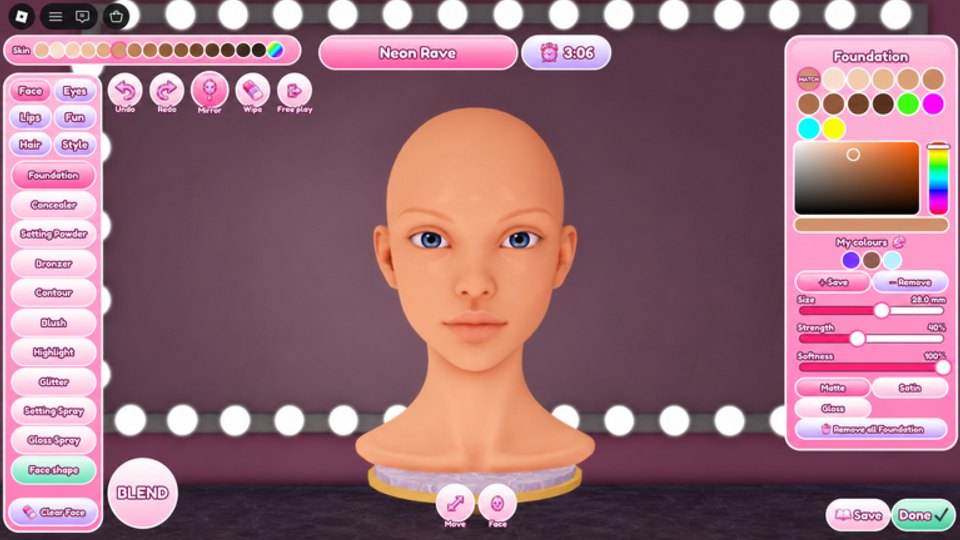
Why controls matter more than talent on day one
MAKEUP ALL STARS rewards painters who know where tools live before the theme prompt drops. The experience works on phone, tablet, and desktop, but precision and layout differ. This guide maps the jobs behind the UI so a patch that renames a tab cannot freeze you mid-round.
Pair this page with Getting Started for the full first-hour loop, then drill muscle memory in Free Play.
Play link: MAKEUP ALL STARS on Roblox.
The eight jobs every session uses
Ignore decorative icons for a moment. Every competitive round asks you to complete these jobs:
- Read the theme — prompt text at round start
- Paint the face — brushes, colors, feature categories
- Choose hair — silhouette and color that match face weight
- Choose lashes — finish weight for the eyes
- Submit — lock the look before the timer
- Vote — anonymous ranking of the lobby
- Collect / spend — coins into the Boutique
- Practice — Free Play between contests
If you can find those eight surfaces quickly, you already beat most panicked lobbies.
Face painting controls
Exact labels shift with polish, but expect clusters like:
- Brush size / hardness — large soft for base, smaller for liner and lip edges
- Color picker / swatches — skin, shadow, blush, lip, highlight families
- Feature tabs — eyes, lips, brows, skin, extras or gems
- Undo / clear — emergency recovery when a stroke muddies the canvas
- Zoom / camera — critical on mobile for crease and cupid’s bow work
Desktop players usually win on fine liner; mobile players win on bold shapes that survive fat-finger blending. Adapt your style to the device you actually queue on—see Makeup Techniques for craft tips that survive Roblox lighting.
Device tips
- Phone: enlarge brush slightly, simplify liner, zoom before detail work, keep a finger free for undo.
- Tablet: best of both worlds—use stylus if you have one; still avoid microscopic glitter spam.
- PC: exploit hover precision, but do not overwork until the timer is gone. Voters prefer finished clean looks over unfinished masterpieces.
Hair and lash pickers
After paint, open the hair catalog and lash catalog. These are not afterthoughts—silhouette decides first impressions in a 10-player voting booth. Match hair volume to eye drama and theme keywords. Full strategy lives on Hair and Lashes.
Controls habit: pick a temporary hair early so lighting context exists, then finalize after eyes are set. Last-second hair swaps are fine; last-second full face rewrites are not.
Submit and timer discipline
Find the Submit / lock control the moment you join. Mentally schedule:
- First 40% of the timer — skin and eyes
- Next 30% — lips, brows, polish
- Next 20% — hair/lashes and silhouette check
- Final 10% — look checklist and submit
Never discover Submit in the last three seconds. If the UI buries it after a patch, re-learn it in Free Play before your next competitive block—then skim Updates.
Vote UI
Voting is anonymous. Controls usually present each look for ranking or selection without showing who painted it. Use that honesty: score theme fit and finish quality. Deep voting psychology sits on Voting Guide and How to Win.
Boutique and codes entry points
Between rounds, locate:
- Boutique / shop — spend coins; watch daily drops (Boutique and Coins)
- Codes / redeem field — when gifts exist (Codes Hub — none active as of November 2026)
- Group / social prompts — optional, but the community group posts teases
Do not open Boutique mid-blend unless you already submitted. Shopping mid-paint is the fastest way to miss Submit.
Free Play controls
Free Play reuses the same painting and hair/lash tools without competitive pressure. Use it to:
- Memorize tab order after UI refreshes
- Test brush sizes for your device
- Rehearse theme keywords from the Theme Idea Board
- Practice submit timing without pride on the line
Details: Free Play guide.
After a UI patch
When Updates mention polish, run this five-minute drill in Free Play:
- Open every feature tab once
- Change brush size twice
- Equip one hair and one lash
- Submit a dummy look
- Open Boutique and confirm the codes entry still exists (or note if it moved)
Write the new locations down. Competitive lobbies punish hesitation more than imperfect blush.
Accessibility and comfort
- Lower graphics if strokes lag—laggy brushes create muddy edges
- Increase UI scale on small phones if tabs feel unreadable
- Take breaks; hand fatigue ruins liner more than any opponent
Controls FAQ mindset
If something “disappeared,” it almost always moved one tab over. Re-orient with the eight jobs list above before assuming a wipe. Creator dnatellaversace iterates the beauty loop; your job is to keep the mental map current.
Next reads: Voting, Hair and Lashes, then back to the Guides Hub for the full map.
Frequently Asked Questions
Quick answers to the most common MAKEUP ALL STARS questions.
Do controls differ on mobile and PC?
Same jobs, different precision. Mobile favors bold readable shapes; PC can afford finer liner if you still finish on time.
Where is the codes button?
Usually inside shop, Boutique, or gift UI. As of November 2026 no public codes are active—see the Codes Hub when one drops.
What should I practice first in Free Play?
Tab order, brush sizing, hair/lash equip, and Submit timing—then craft drills from Makeup Techniques.
I cannot find Submit before the timer ends—what now?
Leave competitive queues, open Free Play, locate Submit deliberately, then return once the muscle memory sticks.
Are hair and lashes part of the paint tools?
They are separate catalogs. Paint first, then match silhouette weight—see the Hair and Lashes guide.